 Blog
Blog
 Oct 2, 2026
When you sell a ticket to your event, does that mean the money is already in your bank account?
That depends.
The path from the ticket purchase to your bank is not a direct route. There are stops for payment approvals, processing, fees, and discounts that have to be accounted for. That money might also make a round trip for a refund. And then, after all of that you’ll see it hit your bank balance. If you are relying on that payment to help support your event, the time it takes can seem endless.
Understanding all of the steps in the payment process is important because when you receive your money matters. Many event promoters rely on ticket sales to pay for things like:
- the venue
- performers
- vendors
- insurance
- advertising
- staff support
Getting ticket payments in a timely fashion means you can plan expenditures accordingly and won’t find yourself overextended or in the red before the event opens.
So the question remains – when will you get paid. The answer depends in part on your ticketing platform. Some platforms “feed” you money as it becomes available while others hold your payments until after the event. A useful option is a platform that gives you access to eligible ticket revenue before the event.
Let’s take a look at each of these ticketing payout options. We’ll look into how they work, where the road bumps are, and which might hold the best payout plan for your event.
How does an event ticket payout schedule work?
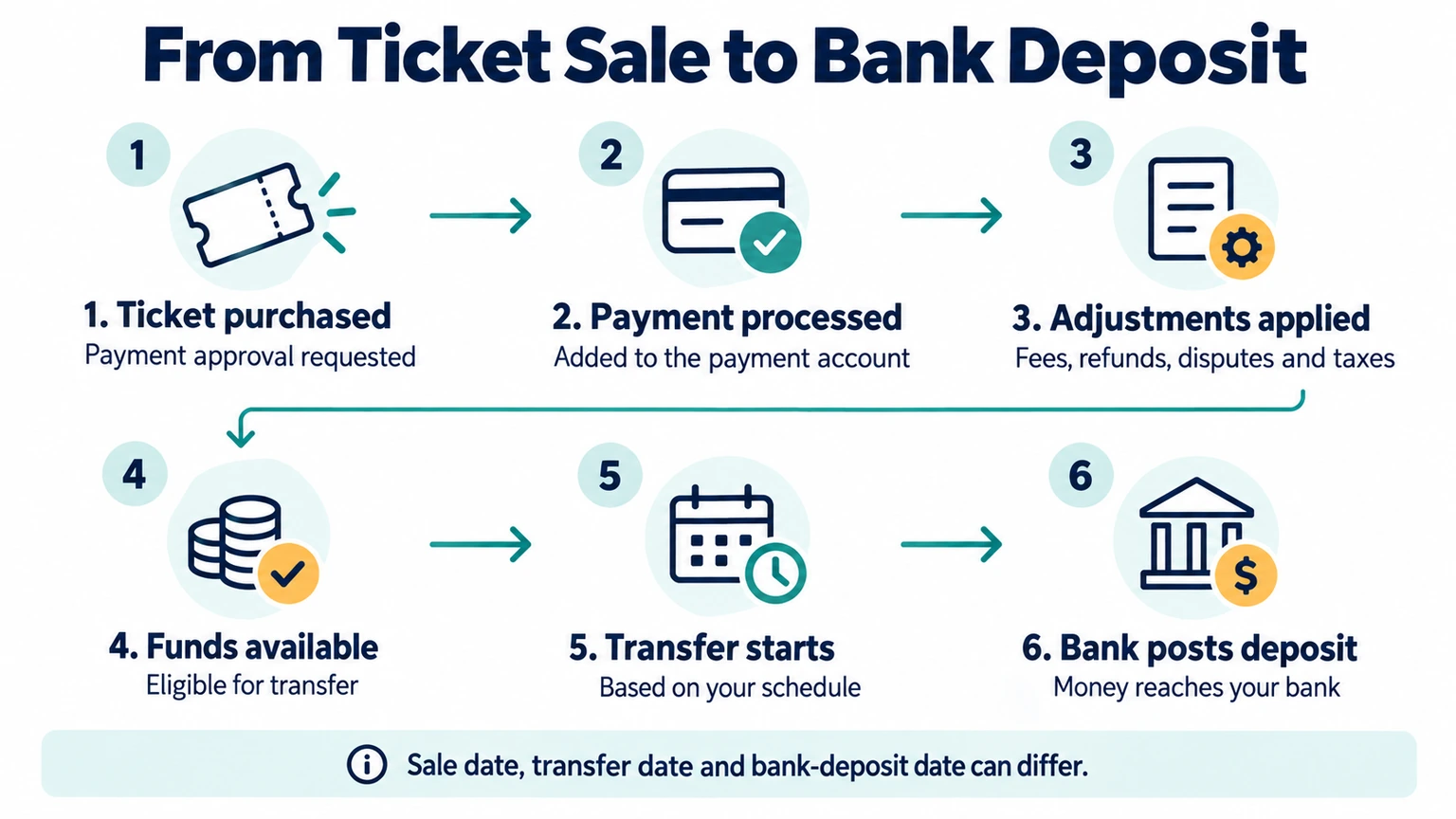
When an event attendee purchases a ticket, there are six basic steps that a payment goes through before it hits your bank account.
- The attendee buys a ticket – a payment processor checks the payment method and asks the bank to approve the charge.
- The payment process is completed – the payment processor adds the payment to your account.
- Adjustments are made for fees – these may include processing fees, ticketing fees, refunds, disputes, and taxes.
- The funds become available. Money may appear as pending in your account before it becomes eligible for transfer.
- The payment transfer starts – payments are made based on your transfer schedule.
- Your bank posts the deposit.
During the payout process it is possible to see three different dates in your ticketing platform associated with the ticket purchase:
- the sale date
- the transfer date
- the bank-deposit date
Payout or settlement? What’s the difference?
Regardless of the ticketing platform you use there are some common terms you should be aware of.
Payment Settlement
When a card payment has been completed and the money reaches your payment processor.
Payout
Also known as a transfer. It occurs when eligible money moves from your ticketing platform balance to your bank account.
Gross ticket sales
The total value of your ticket sales before any fees, taxes, or additional disputes are taken out.
Net ticket revenue
The total that remains from a ticket sale after any refunds, discounts, fees, taxes, disputes, and other adjustments are made. A temporary reserve reduces the current payout, but it does not automatically reduce the revenue you have earned.
Pending balance
Money recorded in the account that is not yet ready to transfer.
Available balance
Money that is currently eligible to be accessed.
Payout or transfer
Money that moves from the payment account to your bank or another destination.
Reserve
Money from ticket sales that is held for a period of time. This is done to help cover refunds, disputes, or other expenses.
Rolling reserve
A percentage of sales held to be released on a pre-set schedule.
A common concern
A common mistake that many people make is thinking that they have a missing payment. The truth is often that the payment is simply working through these processes.
For example, a ticket was sold and a payment was sent. You might see the number in your platform backend but the actual payment may not be appearing. That’s because it is still pending in these processes. This can happen for a number of reasons:
- A transfer could have missed the cutoff time at the processors.
- One of the accounts involved in the process may be awaiting verification.
- Some other step in the process is still under review.
A simple event ticket payout example
Let’s say your event has $5,000 in gross ticket sales. These numbers are only an example, not TicketsCandy pricing or a quote from another platform. A payout could look like this:
| Item | Amount |
|---|---|
| Gross ticket sales | $5,000 |
| Refunds | -$150 |
| Discounts paid for by the organizer | -$100 |
| Taxes withheld | -$300 |
| Ticketing and processing fees paid by the organizer | -$175 |
| Temporary reserve | -$250 |
| Expected current payout | $4,025 |
The $250 reserve may be released in a later transfer if there are no new adjustments. It is not necessarily a permanent loss.
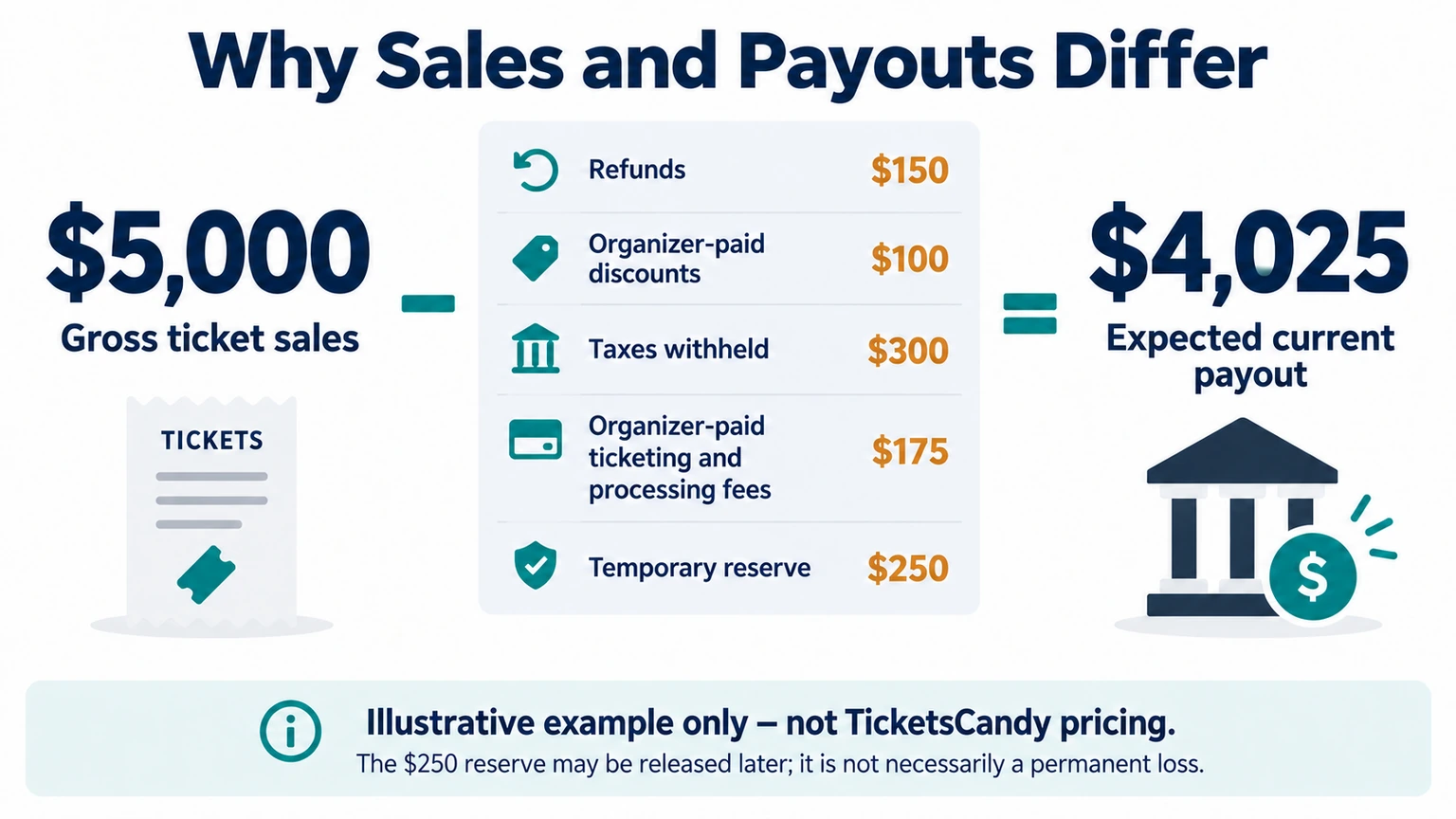
You can see how a deposit that hits your bank account may be smaller than the sales number in your event dashboard. Here is the basic math:
Gross sales – refunds – organizer-paid discounts – taxes – fees – disputes – reserves +/- other adjustments = expected payout
It’s important to note that your real report may organize these numbers differently. Always follow the definitions used by your payment processor and ticketing platform.
Four ticket payout models
1. Direct-to-processor
With a direct-to-processor setup, you connect your own payment-processing account to the ticketing platform. Sales from tickets go into that connected account and the payment processor controls the transfer options.
This is how payouts work at TicketsCandy. We don’t receive, hold, or control your customers’ payments. You are the merchant of record and the funds are processed through your connected Square account.
That setup gives you more control than a platform that holds your ticket revenue until after the event. Square’s standard transfers can make eligible funds available as soon as the next business day.
You don’t have to wait on TicketsCandy to decide when we want to release your money. You’ll set a schedule in your Square account which will direct the transfer of your sales. That can be a big help when you need ticket revenue for an ad campaign, venue payment, vendor deposit, or staff expense before the event.
Note: The exact timing still depends on Square’s rules, your account verification, transfer cutoffs, fund eligibility, and your bank. Some faster transfer options also charge a fee.
2. Platform-managed schedule
In this model, the ticketing platform collects the money from a sale and sends it to you on a pre-set schedule. That might be daily, weekly, monthly, or tied to a certain event milestone.
A frequent payout schedule doesn’t always mean your money is immediately eligible.
3. Post-event
Some ticketing platforms wait until the event is over before sending the main payout. This lowers the platform’s risk if the event is canceled and potential attendees ask for refunds. But this type of payout arrangement can make it difficult for organizers who need the ticket revenue to pay pre-event bills.
One example of this can be found with Eventbrite which is currently offering a standard payout to be sent three business days after an event ends. Earlier payout options may be available to eligible organizers. Your bank will also need time to process the deposit after the payout is sent.
4. Instant
Faster transfers may require a verified account and may only work with eligible funds and include added fees.
How should you compare payout models?
When two ticketing platforms promise different payout speeds, ask these four questions:
| Question | Why it matters |
|---|---|
| When does my money become available? | Daily transfers don’t help if the funds stay pending until an arbitrary milestone is met |
| Who controls the money? | A ticketing platform and a payment processor may use different rules for accessing payments. |
| What can change the amount that is available to transfer? | Fees, refunds, disputes, taxes, reserves, and adjustments can lower a payout amount. |
| What do reports show? | You should be able to customize reports to show you payouts, events, and funds that were withheld. |
You should also ask how the system handles recurring events, multiple location events, and timed-entry tickets. For example, does one bank deposit include sales from several events or time slots. That isn’t necessarily a problem, but you need reports that make a deposit easy to understand.
What can reduce or delay an event payout?
A payout could leave a ticketing platform as scheduled but find the path to your bank account filled with blocks. Among those could be:
Your account or bank isn’t fully verified
Payment processors need to ensure that an account is yours so before accepting transactional activity they will need to verify your:
- identity
- business information
- bank account
To avoid delays, finish verification before you start selling tickets. Don’t wait until your first big invoice is due as verification can take several business days.
The bank information is wrong or outdated
If you’re not careful, a transfer could be sent to an old account, rejected by a closed account, or held up because bank verification was never finished. To avoid unnecessary delays, check the destination account inside the payment processor, not just inside the ticketing platform.
The sale missed the daily cutoff
Sales completed after the processor’s close of business may need to wait to be transferred until the next business day. Sales that take place on weekends and national holidays can also add time between the transfers.
A refund changed your balance
A refund can reduce the money available for your next payout. Depending on your transfer settings, Square may deduct it from your payment balance or debit your linked bank account. The refund may also appear on a different date from the original ticket sale.
A buyer opened a dispute or chargeback
If a buyer asks their bank to reverse a payment, the processor may hold the disputed amount while the bank reviews the case. Square can withhold funds from your balance or debit your linked bank account. Keep your order details, refund policy, attendee emails, and proof that the event took place so you can respond.
A reserve or account review applies
A processor may hold some money in reserve to cover possible refunds or disputes. New accounts and businesses that collect payment before delivering a service may receive extra review. Check your account notices so you know what is being held and when it may be released.
Fees, taxes, currency, or minimums changed the total
Sometimes a payout isn’t late. It’s simply smaller than expected. If this happens, check whether you chose to pass fees to attendees or pay them yourself. Then find out whether taxes are being held or sent on your behalf. Also look for currency conversions and minimum transfer amounts.
This is why it’s important that you don’t build your event budget around the idea that every dollar of advance ticket revenue will always be ready to spend immediately.
How do you read and reconcile a ticket payout report?
Reconciliation is about understanding how your ticket sales became a bank deposit. To do that, you need three records:
- Ticket orders
- The payment processor’s transfer activity
- Bank deposit record
With this information, these three steps can help you work through the reporting process.
1. Develop a strong report
To be as insightful as possible, your reports should include:
- Order and transaction ID
- Event, date, time slot, and payment location
- Sale and settlement date
- Ticket subtotal and discounts
- Taxes and buyer-paid fees
- Organizer-paid ticketing and processing fees
- Full and partial refunds
- Disputes and chargebacks
- Reserves and reserve releases
- Other adjustments
- Net amount
- Transfer ID, transfer date, status, and destination account
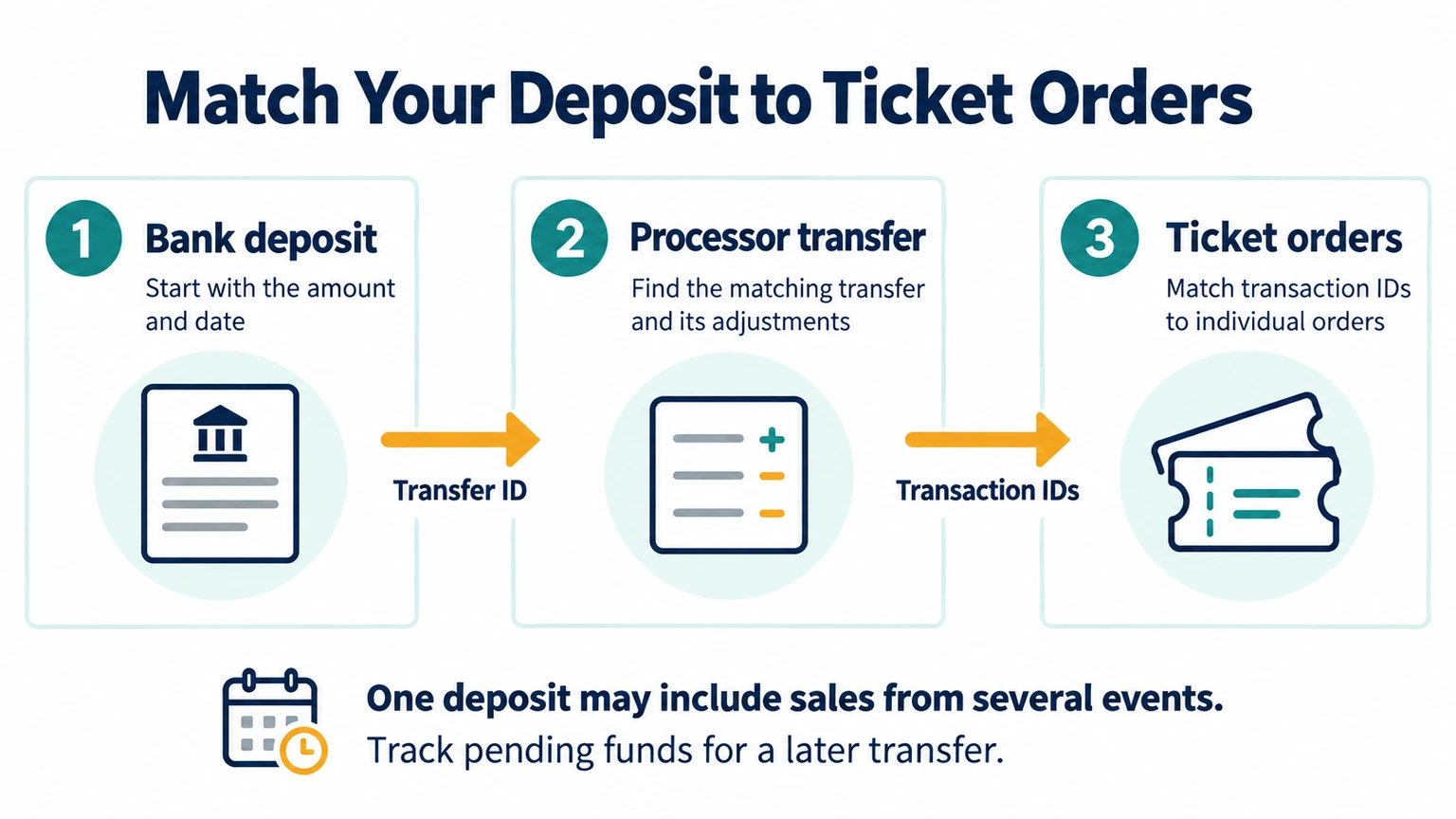
2. Validate your bank deposit
- Start with the deposit amount and date on your bank statement.
- Find the matching transfer in your payment processor.
- Open the transfer details and review the included payments and adjustments.
- Match the transaction IDs to the ticket orders. Remember that one deposit may include several events so the transfer ID is usually the best link between your payment records and your bank statement.
- Group the orders by event, venue, or time slot for your own records.
- Make a note of any pending money that should appear in a later transfer.
3. Reconcile the sales numbers
- Are the reports using the same date range and time zone?
- Were some recent sales still pending at the transfer cutoff?
- Did a refund appear after the original ticket sale?
- Was money held because of a dispute?
- Was a reserve created or released?
- Were taxes or fees handled differently than you expected?
- Were several events or locations combined into one transfer?
- Does the processor show a completed transfer that your bank hasn’t posted yet?
How does payout timing affect ticket sales cash flow?
An event can look profitable on paper but still run out of cash. That’s why cashflow is so important, particularly during the planning process. When planning the business side of the event, don’t build it around getting paid when a ticket is sold. Instead look for the safest expected payout arrival date.
To do this list the dates when you need to pay for:
- Venue rental payment schedules
- Deposits for performers or speakers
- Permits and insurance
- Equipment, security, and production
- Employees and contractors
- Advertising
- Food, merchandise, and supplies
- A contingency fund for possible refunds and emergencies
With this information you can build three simple cash-flow plans based on the needs of your event.
1. Conservative plan
Assume transfers take the longest time allowed by the current terms of the ticketing platform. Use this plan for bills that could put the event at risk if you pay them late.
2. Expected plan
Built around your verified transfer schedule and known payment dates.
3. Faster-transfer plan
Allows for instant or same-day transfers. Faster access can be useful, but it shouldn’t be the only thing keeping your event budget together.
One other thing to check: Recurring, multi-day, and timed-entry events may produce combined or staggered transfers, depending on the provider’s payout and reporting rules.
12 questions to ask before choosing a ticketing platform
It’s important for your long-term success as an event producer that you find a ticketing platform that doesn’t just pay quickly but gives you control over your sales revenue. These twelve questions can help you ensure that the platform fits the business needs of your event.
- When will my first payout be sent?
- Can I receive funds before the event starts?
- Who will be listed as the merchant of record?
- Does the ticketing platform hold my money or does it go directly to my connected payment account?
- Could the disbursement of my sales revenue be held or delayed?
- Which fees do attendees pay and which fees come out of my revenue?
- Does the platform have a dashboard or reporting tool to show changes to my sales totals from refunds, chargebacks, taxes, and other adjustments?
- What tools are available to match bank deposits to individual ticket orders?
- If I am running multiple events through a platform will transfers happen by event or in one lump sum?
- What happens to the money if my event is postponed or canceled?
- What verification do I need to complete a transfer?
- Are there any regional limits that would affect the amount I could transfer?
Your payout checklist before ticket sales open
Before the first ticket is sold, take a few minutes to check the details that will keep your payments moving:
- Complete your identity, business, and bank verification.
- Confirm your payout schedule and the bank account that will receive the money.
- Run a small test payment and refund when possible.
- Check how the test order appears in your ticketing dashboard and payment report.
- Export a sample transfer or reconciliation report.
- Choose someone on your team to monitor financial and verification notices.
- Match vendor due dates to your conservative cash-flow plan.
- Keep a cash buffer for refunds and unexpected delays.
TicketsCandy gives you control over ticket revenue
At TicketsCandy, we use a direct-to-processor model because we believe event organizers should control what happens to the money from their ticket sales. This means we don’t receive, hold, or control your money. All of your payments are processed through your connected account based on the terms of the payment processor connected to your account.
With TicketsCandy your event payments are collected in your Square account. You can use the transfer choices available to your Square account and location to move eligible funds to your bank account. To do that you can choose:
- Standard transfers: Any eligible funds can reach your bank as soon as the next business day, with no transfer fee.
- Custom timing: You can choose when payouts are made to better fit your business schedule.
- Manual transfers: Move funds when you need and choose to.
- Instant transfers: If you’re hit with an unexpected expense, you may be able to transfer eligible funds immediately, although certain fees and Square restrictions apply.
- Same-day transfers: Eligible funds are sent after your scheduled close of day, although certain fees and Square restrictions apply.
This is not one-size-fits-all, it’s individualized control that allows you to use your sales revenue as you need to in order to make your event a success.
Square does still retain certain controls over which funds are eligible and how verification, reserves, cutoff times, and transfer limits work. Your bank may also add processing time. We don’t want to hide those details behind a vague promise of “instant payouts” instead we want to highlight the real advantage that Square provides by giving you true control, with several ways to manage when eligible funds move to your bank.
Your payout setup should work for your event
When considering a ticketing platform pay close attention to the payout process. Payment speed is important but it shouldn’t be the only part of the equation. It will also be important to know:
- Who controls the money
- When you’ll get access to it
- What can be deducted (fees, taxes, etc)
- How the platform will reconcile ticket sales with bank deposits
If you want your ticket revenue processed through an account you control instead of being held up by the platform’s payout process, take a closer look at TicketsCandy.